
Blizzard has added gamepad support to World of Warcraft: Forever and published a guide on November 3 that explains how players can switch from keyboard and mouse to a controller, how the interface is mapped, and which parts of the feature are still in beta.
The developer says the mode has been refined around “targeting, casting, looting, and menu navigation” while keeping the familiar feel players already know. Controller support is available now for players who prefer a gamepad, but Blizzard also says it remains in a functional beta and that interface updates are still ongoing.
The update lands as Blizzard continues to expand WoW: Forever ahead of launch-era play, including the game’s class changes, hotfixes, and other system updates. This controller pass is meant to change how players interact with Azeroth, not what is there to do once they arrive.
How to switch on gamepad controls
Blizzard says WoW: Forever supports all XInput-compatible controllers and includes Xbox and PlayStation button icons to help players recognize the controls. To switch over, players need to press Escape, open the Game Menu, select Options, and then choose Gamepad under Gameplay.
Once the mode is enabled, the Gamepad settings menu lets players adjust Camera, HUD Modifier, Frame Focus Style, Action Bars, Targeting, and Raid Targeting Options. Blizzard advises players to spend time setting up the layout before jumping into a busy fight, and says the best setup is one that matches the spells and abilities a player uses most often.
The studio also points to a small visual touch for supported lighting on controllers. The light turns red for a Horde character and blue for an Alliance character.
Blizzard’s guide says the controller mode is built to feel familiar once players start moving, selecting targets, and using abilities. It encourages players to try the controls before heading into crowded combat so the layout feels natural before a dungeon pull, raid encounter, or other hectic moment.
Movement, targeting, and the core buttons
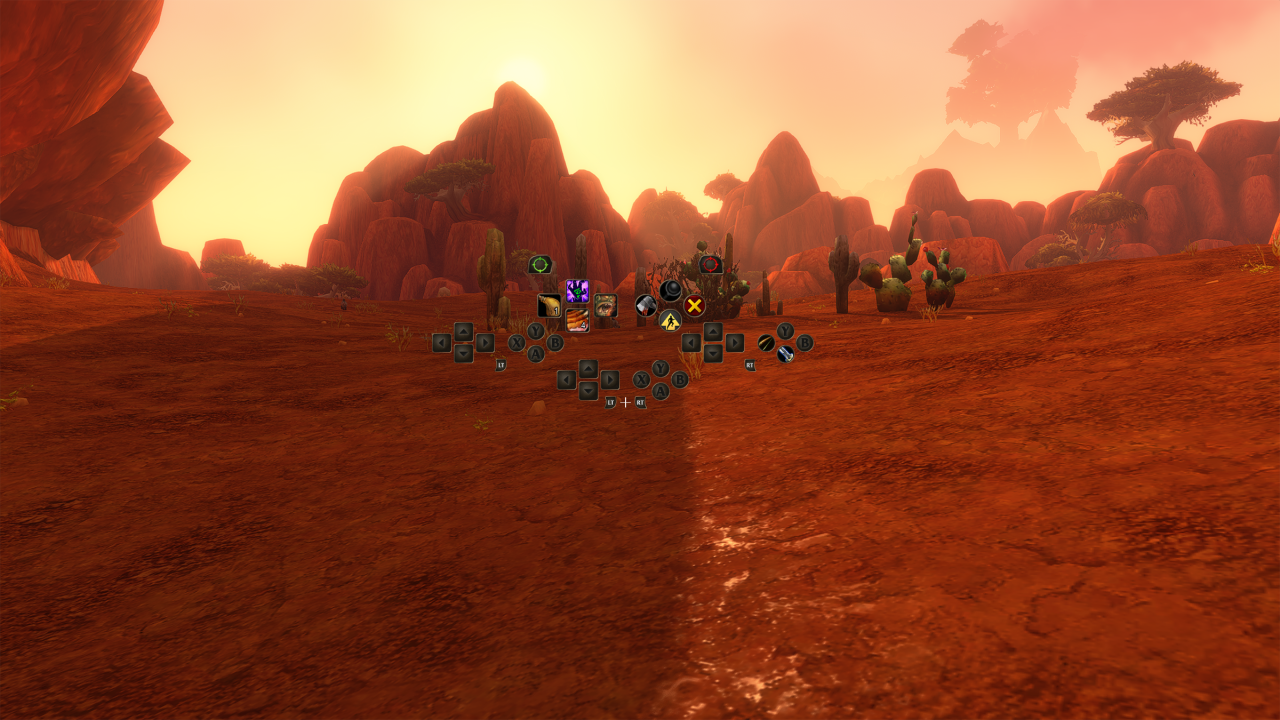
The guide breaks the controls into a few basic actions. Movement uses the left stick, while the right stick controls the camera. Friendly targets are selected with the left bumper, and hostile targets with the right bumper. On the controller map, X is listed for Interact, A for Jump, B for Back, and Y for Inspect, although Blizzard notes that these buttons also have spell functions.
Action bars are tied to the triggers. Holding LT, RT, or both triggers together gives access to different action bars, and releasing the triggers returns players to the default bar. The Menu button opens the Main Menu, while the View button, shown with overlapping squares, is used for Change Focus Frame. Blizzard also says players can zoom the camera by holding both bumpers and moving the right stick forward or backward.
The targeting setup is meant to help with the game’s group roles, including tanking, healing, and dealing damage. Blizzard says the friendly and hostile targeting controls are there to help players choose allies and enemies at the right moment while playing with a party.
Four action bars and 84 ability slots
Blizzard says the gamepad HUD is arranged around the controls in the player’s hands. The layout shows four action bars, and each bar can hold a different set of spells and abilities while using the same button structure. Players can switch between bars with LT, RT, or LT + RT, and the HUD updates to show whatever abilities are available on the active bar.
The official guide gives a Mage example to show how one directional button can be mapped to different spells depending on the trigger combination. Blizzard says those are example assignments, not fixed bindings, and players should choose whatever setup suits their own playstyle.
Players who want separate layouts for combat, utility abilities, or frequently used actions can also switch between three action bar sets by holding LB + RB and pressing Left or Right on the D-pad. Each set contains four action bars with 28 slots combined, giving players 84 customizable spell and ability slots across all three sets. Blizzard says the button layout stays consistent as players switch sets, so they can reach different groups of abilities without opening menus.
The controller HUD also includes quick access to common interface features. Hold both shoulder buttons, LB + RB, and then press the following buttons to reach frequently used screens and tools:
- LB + RB + B: Open Backpack
- LB + RB + Up: Access Quest Tracker
- LB + RB + Down: Access Chat
- LB + RB + Y: Manage Buffs
Blizzard says these shortcuts can also be reached through the main radial menu. Typing in chat still requires a keyboard.
What the beta still lacks
Blizzard is clear that the feature is not finished. A gamepad legend sits in the upper-left corner of the main screen, and it expands when players take certain actions to show more options. Most screens also include gamepad footers that show the interaction options for each panel, but not every screen has one yet.
The studio says the HUD and menus are still being refined, including the bags and other interface pieces that need to be easier to navigate with a controller. That work is part of the same beta state Blizzard assigns to the feature overall.
The company also says reducing the need for keyboard input remains a development goal, with a keyboard-free experience as the longer-term aim. For now, Blizzard wants players to keep a keyboard within reach for tasks such as typing in-game chat.
Blizzard’s guide closes by telling players to ready their gamepad, gather their party, and try the controls for themselves. The support is in place now, but the studio is still iterating on how the interface behaves from one screen to the next.
Readers who want a broader look at the game’s recent updates can also read GAMER2GO’s coverage of WoW: Forever’s launch plans and early systems.


the 84 slot thing is wild tbh. if the triggers really swap cleanly between bars, that could be huge for classes with a messy kit like mine
not sure i agree, because 84 slots sounds big but most players will never use all of them cleanly in real play.
fair point, but i think the point is more about having room for utility and not blowing up your layout. on a mage or druid i can see that helping a lot even if you never press every slot.
that is exactly why i am interested, actually. on a class with lots of situational buttons, having separate sets for combat and utility could make the whole thing feel less cramped. in raids you do not want to be hunting for a random cooldown or a niche spell while mechanics are going off. if Blizzard keeps the layout consistent between sets, that could make controller play much more practical than people expect.
yeah, i can see that. i still think some specs will feel awkward, but the utility split is probably the smartest part here.
for people who tried controller in WoW before, is targeting actually decent with bumper select or does it feel clunky in combat?
for single target stuff it is fine, but tabbing through mobs can get messy if the pack is spread out
that sounds better than i expected, honestly
decent enough
I would start with the friendly/hostile bumper setup and test on training dummies first. If you already use a lot of keybinds, the trigger bars seem easier than radial menus.
the part about still needing a keyboard for chat is the real limiter here. controller support sounds nice for movement and combat, but if you still have to keep reaching for keyboard every time you type, it is not the full couch setup people want. i get that they want to polish the HUD first, but the longer-term aim sounds like the thing that actually matters. right now this feels more like a convenience option than a real overhaul.
chat on keyboard is normal though
for a beta feature, sure, but that is still the bit people will notice most. if they want it to feel finished, chat is the obvious hole.
sure, but that is not a dealbreaker for me. if the buttons feel good in combat, i can live with typing on keyboard for now.
84 slots is insane
yeah and half of them will still be on cooldown when you need them xD
red for Horde, blue for Alliance lol
kinda cute but also useless i reckon. i am not staring at my controller light in a dungeon pull
true, but it is still a nice little touch for people using the mode. not game changing, just one of those details that makes it feel less bolted on. if the rest of the HUD ends up as clean, the light is a bonus instead of the feature.
fair, blizzard loves their tiny flavour bits
do you think the bumper targeting will be enough for tanking, or is this mostly made for questing and casual play?
for pure tanking i would not trust it yet. in my raids, picking the right add fast is already hard enough on mouse and keyboard when people stack badly, and controller bumpers sound even worse once the room gets messy. maybe for dungeons it will be okay, but on bigger pulls or boss swaps i would want the old setup nearby as backup.
anyone else think the gamepad legend in the top left sounds like it might clutter the screen a bit in raid frames?
this still feels like a beta checkbox, not a real feature yet
i think that is a bit harsh. they are already talking about targeting, loot, action bars and raid stuff, which is more than a checkbox to me.